Canvas By Instructure
- 4.5
- Rating
- 10.00M
- Installs
- Free
- Price

 Analysis by App-foxy
Choosing a course companion is less about finding the app with the longest feature list and more about matching the tool to the way your school or university already works. I spent time using Canvas as an education app, checking how it fits into a normal study routine rather than treating it as just another place to read announcements. My impression is clear: it is most useful when your institution has already adopted the Canvas learning platform and your instructors actively use its course spaces.
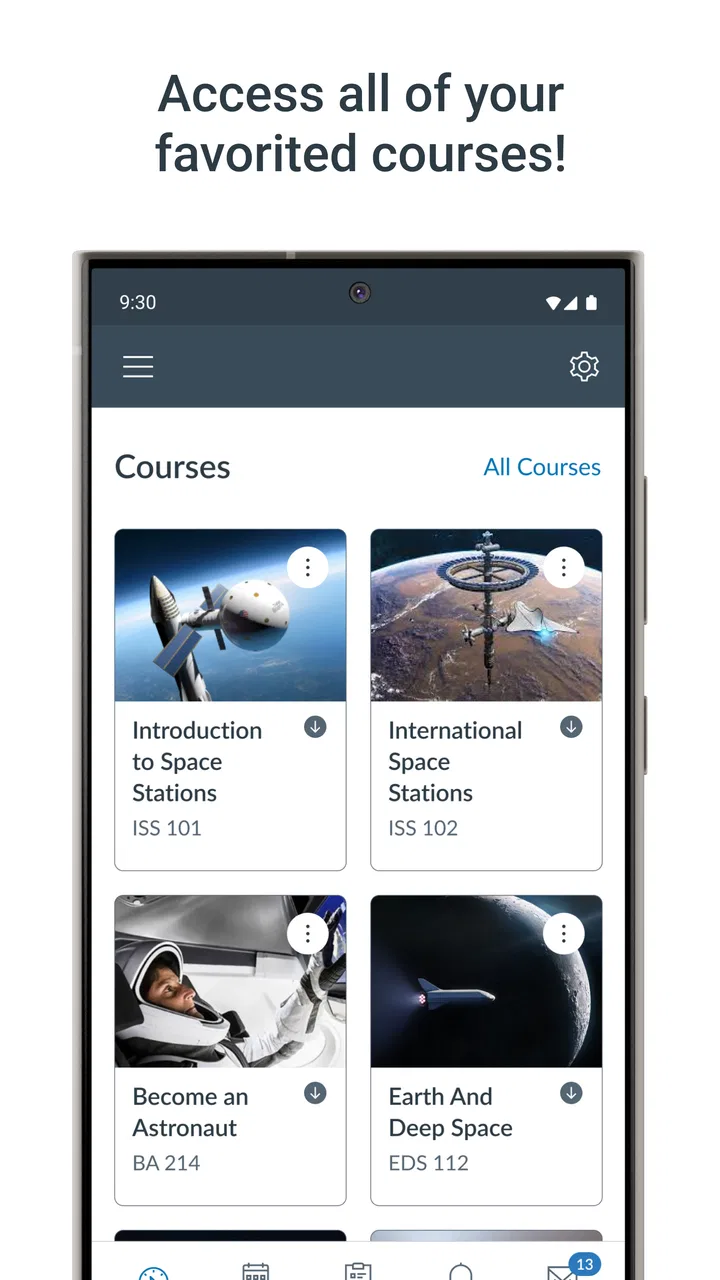
Canvas by Instructure is free, aimed at Everyone, and available for devices running iOS 9 or later. Its basic job is to bring course activity into a mobile format: assignments, grades, messages, schedules, and learning materials can be reached without sitting at a desktop computer. That sounds straightforward, but the real value appears when several classes are moving at once and I need one place to see what deserves attention next.
The app has been around since December 22, 2012, and its scale is easy to understand from its presence in the education category: it has passed 10 million installs, with an average rating of 4.6 from around 220 thousand ratings and about 28 thousand written reviews. Those figures do not guarantee that every school setup will feel smooth, but they do suggest that this is an established classroom tool rather than a small experiment.
You May Also Like

 Blood Strike: 2.5 Anniversary
Blood Strike’s Loadouts Turn Every Drop Into a Tactical Gamble
A close look at Blood Strike’s custom loadouts: how fast access to signature weapons reshapes its battle royale rhythm, rewards preparation, and narrows the gap between fights.

 Pandora - Music & Podcasts
Pandora’s Music Is Easy to Start, but Harder to Recover
Pandora’s strength is its low-effort path from a seed to a station. Its weak spot is how much confidence it asks you to place in connection, setup, and quiet recovery.

 8 Ball Pool
 Is Built on Rivalries, Rematches, and Routine
A close look at the rivalries, rematches, shared routines, and unanswered safety questions that turn a quick pool match into a persistent mobile community.

 Samsung Music
’s Quiet Strength Is Playing What You Already Own
Its reach comes less from spectacle than from dependable access to a personal library. That simplicity is both the app’s strongest retention engine and its ceiling.

 AccuWeather: Weather Radar
AccuWeather Review: A Quick, Clear Forecast for Everyday Decisions
For everyday plans, the best forecast is the one you can understand quickly. AccuWeather makes rain timing, radar, and local conditions easy to act on, with a few trade-offs.

 Hill Climb Racing
Why Hill Climb Racing Still Turns Crashes Into One More Run
A tiny car, a bumpy hill and one more upgrade: Hill Climb Racing keeps resurfacing because its simple chaos makes every near-miss feel personal.
More From Our News Desk



How I would decide whether Canvas fits
I’d use this section to make the choice practical: first check whether your courses are actually organized in Canvas, then consider whether quick mobile access would solve a recurring problem in your week. I’d also think about how you prefer to study, because a course hub can be a useful daily companion without replacing the writing, planning, or note-taking tools that suit you best.
Start with the institution, not the download button
The first question is not whether the mobile interface looks appealing. It is whether your school, college, or training provider uses Canvas for your courses. This app is tied to the learning environment configured by the institution, so downloading it alone does not create a useful classroom. If your teachers distribute work through another platform, Canvas will not replace that system simply because the app is installed.
That is an important distinction from general note-taking apps, study timers, cloud drives, and flashcard tools. Those products can be useful independently. Canvas becomes valuable through the courses connected to your account. I would therefore check the sign-in instructions from the institution before changing my study workflow. A student with no active Canvas courses has little reason to choose it over a normal calendar or document app.
Judge it by the work you actually do
I would also look at the balance between monitoring and creating. Canvas is particularly strong for keeping track of coursework: opening an assignment, checking instructions, reviewing a grade, reading a course announcement, or sending a message at the right moment. It is less convincing as a complete replacement for every tool used to produce schoolwork. Long essays, detailed spreadsheets, design projects, and serious file editing are usually more comfortable in dedicated applications.
That does not make the mobile app weak. It means I see it as the control panel for a course rather than the entire study desk. The distinction helps avoid a common frustration: expecting a phone screen to be equally good at planning, reading, writing, editing, and submitting every kind of academic work.
Think about notification discipline
Notifications can be helpful when a deadline changes or a teacher posts an important update, but they can also turn the phone into a constant source of school noise. I would use Canvas notifications deliberately, especially if several courses are active. A useful approach is to keep alerts for direct messages, new announcements, and changes that affect deadlines, while checking the course area at a chosen time for less urgent activity.
This is one of the less obvious decisions around the app. The best setup is not necessarily the one that produces the most alerts. It is the one that helps me notice meaningful changes without making every school interaction feel like an emergency. Students who already struggle with notification overload may prefer to use the app for scheduled checks rather than leave every alert enabled.
Offline access is useful, but it is not a substitute for preparation
One of Canvas’s practical advantages is the ability to study offline. I found that this matters on commutes, in buildings with unreliable reception, or when I want to review material without spending the whole session online. The sensible workflow is to open the relevant course content while connected, identify the readings or instructions I need, and then treat offline access as a backup for review.
I would not rely on offline use as a complete submission strategy. Coursework often involves a final upload, a message, or a status update, and those actions depend on reconnecting at the right time. The useful trade-off is simple: Canvas can help me keep learning when connectivity disappears, but I still plan submissions around a reliable connection rather than assuming every task can be finished offline.
Version and device age deserve a quick check
The current version is 8.5.0, and the minimum operating system is iOS 9. That makes the app approachable for people using older Apple hardware, although the experience can still depend on the age, storage, and general condition of the device. On a small or aging phone, reading dense course pages and handling attachments may feel more tiring than doing the same work on a tablet or computer.
I would use the phone for quick checks and urgent actions, then move to a larger screen for concentrated reading or complicated submissions. That division is not a flaw unique to Canvas; it is a realistic way to get more from a mobile learning app without forcing every academic task into a pocket-sized interface.
Where Canvas wins in everyday study
The strongest part of my experience is the reduction of scattered course information. Instead of remembering which email contained an announcement, which website held a grade, and which message described an assignment, I can begin with the course space. That does not eliminate the need for organization, but it gives me a consistent starting point.
For a student taking several classes, this matters more than a flashy design detail. A missed announcement can be more damaging than a slightly awkward menu. Canvas helps me move from “What is happening in this course?” to “What should I do next?” with less searching. The benefit grows when instructors use the same environment consistently and keep their materials current.
A realistic weekday workflow
Imagine I am leaving campus with two assignments due soon. On the bus, I open Canvas and check each course rather than relying on memory. I review the instructions, look at the dates, and confirm whether a recent announcement changed the task. If the reading is already available for offline study, I continue reviewing it after the connection drops. Later, at home, I use a larger screen to finish the work, return to Canvas to attach it, and check that the submission appears as expected.
That routine shows where the app earns its place. It is not doing the deep writing for me, and it is not replacing my notes. It is helping me keep the course requirements visible while I move between locations and devices. The final check is especially worthwhile because it turns submission into a deliberate step instead of an assumption that the upload worked.
Grades are more useful as a pattern than as a single result
Canvas makes it convenient to look at grades, but I would avoid using the app as a source of instant reassurance or panic. One result can be incomplete, weighted differently, or waiting for instructor feedback. The more useful habit is to review several results together and compare them with the course instructions.
This is another reason I prefer the app as part of a broader study routine. It can show me where I stand, but it cannot replace a conversation with an instructor when a grade seems unclear. Students who want a complete personal finance-style dashboard for academic performance may find the course structure less satisfying than a dedicated planning system, but Canvas is still valuable for seeing the information where the class publishes it.
Submitting work from a phone: convenient, not always ideal
Mobile submission is handy for a finished document, a photo of handwritten work, or a last-minute correction when the file is already prepared. I would be cautious about composing and formatting a major assignment entirely inside the phone workflow. Small screens make it easier to select the wrong file, miss an instruction, or overlook a formatting problem.
My preferred method is to prepare the work in the application suited to that file type, confirm the filename, and then use Canvas for the final handoff. After submitting, I check the course activity or submission state rather than immediately closing the app. This small habit reduces uncertainty and is one of the most practical ways to use the mobile version responsibly.
Communication is useful when it stays course-specific
Having course communication near assignments and announcements is more helpful than keeping every academic conversation in a general messaging app. Context matters: when I return to a course, the relevant message is easier to connect with the associated work. That can save time when a teacher explains a change or when I need to revisit an instruction.
The limitation is that the quality of this experience depends on how instructors organize communication. A well-maintained course feels clear; a crowded course with inconsistent naming or frequent low-priority updates can still feel confusing. Canvas provides the structure, but it cannot impose good teaching organization on every course.
Where another category may fit better
If my main need is distraction-free writing, I would choose a dedicated word processor. If I want spaced repetition, I would look toward a flashcard app. If I need a personal task system that combines school, work, errands, and appointments, a planner or calendar may be more flexible. Canvas is not trying to be the best version of all those categories, and using it as though it were can make the experience feel incomplete.
It also may not be the right choice for independent learners who are not enrolled in a Canvas-based course. A general online course marketplace, a reading app, or a note system could provide more value in that situation because those tools are built around self-directed study. Canvas makes most sense when there is an existing course relationship behind the login.
For families comparing learning tools for younger students, the Everyone content rating is reassuring, but age suitability is only one part of the decision. The actual course content, school rules, and level of supervision matter more than the label alone. I would treat the app as an access point to an institution’s learning space, not as a standalone educational game or an open-ended children’s learning library.
The cost of switching is mostly organizational
Because Canvas is free, the financial barrier is low. The more meaningful cost is changing habits. If I move from checking email, a school website, and paper handouts to relying on Canvas, I need to decide where my personal reminders live, how I archive important files, and when I review course updates. Installing the app is quick; building a dependable routine takes longer.
I would not abandon a working system overnight. For the first week, I would compare Canvas with the existing course channels, confirm that every class appears, and record which types of updates arrive in each place. Once I understand the institution’s workflow, I can reduce duplication. This gradual transition is safer than assuming the app automatically contains every detail a teacher may share elsewhere.
There is also a learning cost when moving between mobile and desktop. A student may understand where to find grades on a computer but need time to become comfortable with the phone layout. I consider that a reasonable trade-off because the mobile version is most valuable during short gaps in the day, when opening a computer would be inconvenient.
What I would do before relying on it
I would begin by signing in and checking every active course. Then I would open the assignment area, review the grade view, inspect the notification choices, and test whether key reading material remains available when the connection is interrupted. I would also perform a low-risk submission if the course allows it, so I know how the final confirmation looks before a real deadline arrives.
For attachments, I would keep a clear file naming habit outside the app. A name that includes the course and assignment makes mobile selection less error-prone than choosing between several files with vague labels. I would also avoid waiting until the last minute for a large upload, particularly when working from a phone or an unstable network.
These steps sound ordinary, but they address the points where learning platforms usually create stress: an account that is not connected to the right course, a notification setting that hides an important change, an unfamiliar submission screen, or a file that is difficult to identify. Canvas is easier to trust after I have tested those parts in advance.
Who should use it, and who should look elsewhere?
I recommend Canvas to students whose institutions already use it and who want a practical mobile view of their coursework. It is especially suitable for people who move between campus, home, work, and public transport, or who need to check deadlines and instructions without opening a full desktop setup. It is also a sensible companion for learners who want offline access to prepared course material.
I would be more hesitant to recommend it as the only study tool for someone who needs advanced writing, project management, intensive annotation, or a unified planner across many parts of life. In those cases, Canvas can remain the official course hub while another application handles the specialized work. That combination is often better than forcing one app to cover every need.
My recommendation after using it
Canvas succeeds because it focuses on the relationship between a learner and an organized course. I like it most when I use it to check what changed, confirm what is due, review feedback, and complete straightforward course actions while away from a computer. Its offline study support and mobile access make it more than a simple notification viewer, but I still prefer a larger screen for demanding reading, writing, and file preparation.
The app is free, comes from Instructure, and has the reach expected of a mature education platform. Its 4.6 average and more than 10 million installs make it an easy option to consider, but the deciding factor remains the quality of the institution’s Canvas setup. A carefully organized course can make the app feel indispensable; a poorly maintained one can make even a capable tool feel confusing.
My clear advice is to use Canvas when it is already the official home of your courses, but pair it with dedicated tools for serious creation and personal planning. That approach respects what the app does well without expecting the phone to become an entire classroom, office, and study desk. For the right student, it is a dependable way to stay connected to coursework; for someone outside a Canvas-based program, another category of app will probably be the more natural choice.
FAQs for Canvas By Instructure
01What is Canvas by Instructure used for?
Canvas by Instructure is a versatile learning management system (LMS) designed to facilitate online education. It is widely used by educational institutions to manage courses, assignments, grades, and communication between instructors and students. It provides a user-friendly platform for both teaching and learning, making it an essential tool for modern education.
02Is Canvas by Instructure compatible with mobile devices?
Yes, Canvas by Instructure offers a mobile app that is compatible with both Android and iOS devices. This allows students and educators to access course materials, submit assignments, and engage in discussions on-the-go. The app is designed to provide a seamless experience similar to the desktop version, ensuring flexibility and accessibility.
03How secure is Canvas by Instructure in terms of data privacy?
Canvas by Instructure places a strong emphasis on data privacy and security. It complies with FERPA regulations, ensuring that student data is protected. The platform uses encryption to safeguard information and offers various security features like two-factor authentication, helping to keep user data secure from unauthorized access.
04Can instructors customize courses within Canvas?
Instructors have the ability to customize their courses extensively within Canvas. They can create modules, upload resources, design quizzes, and set up discussion boards. The platform also supports multimedia content, allowing educators to tailor their courses to fit specific teaching styles and meet the diverse needs of their students.
05Does Canvas by Instructure offer support for users?
Canvas by Instructure provides comprehensive support for its users. In addition to a detailed Help Center with guides and FAQs, users can access community forums for peer support. Many institutions also offer dedicated support teams to assist with technical issues or platform navigation, ensuring users can effectively utilize the LMS.
Pros
- User-friendly interface
- easy navigation.
- Comprehensive course management tools.
- Seamless integration with third-party apps.
- Robust communication features for students.
- Mobile app syncs well with desktop version.
Cons
- Limited offline functionality.
- Occasional sync issues with notifications.
- Some features require a learning curve.
- Customization options are limited.
- Can be resource-intensive on older devices.

Canvas By Instructure
Gallery